 LearnLedger
Padha kitna?Yaad kitna?
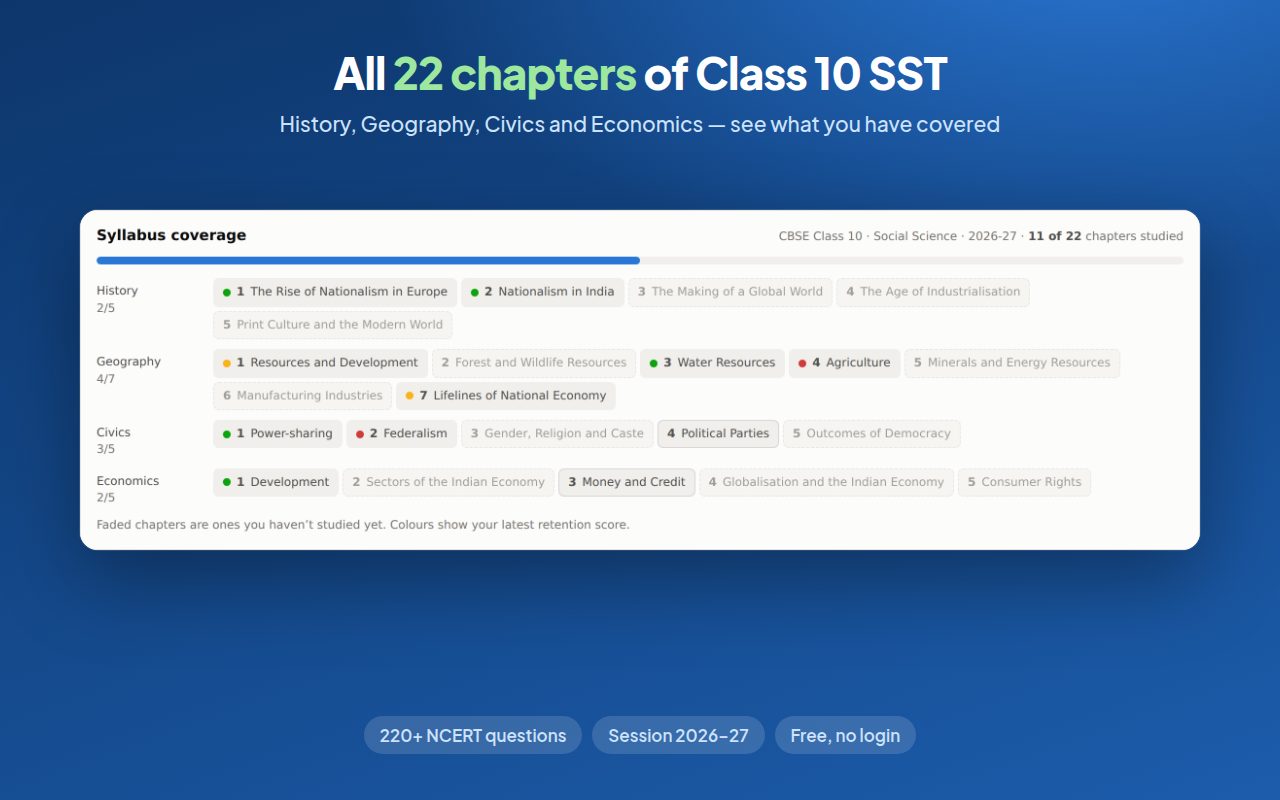
SST is the subject you forget fastest. LearnLedger keeps a record of every chapter you study on YouTube and NCERT sites, checks what you still remember, and tells you which chapter to revise next. All 22 chapters of Class 10 Social Science, with its own question bank.
SST isn’t hard. It’s just impossible to hold in your head till March.
Jallianwala Bagh, Poona Pact, Frankfurt Parliament — all blur together by the pre-boards.
Soil types, ports, minerals. You revised them once. Still fresh?
Prudential or moral? Coming together or holding together? Easy to mix up.
Collateral, GDP, disguised unemployment — learnt in August, gone by December.
Study as usual. LearnLedger takes it from there.
Watch or read
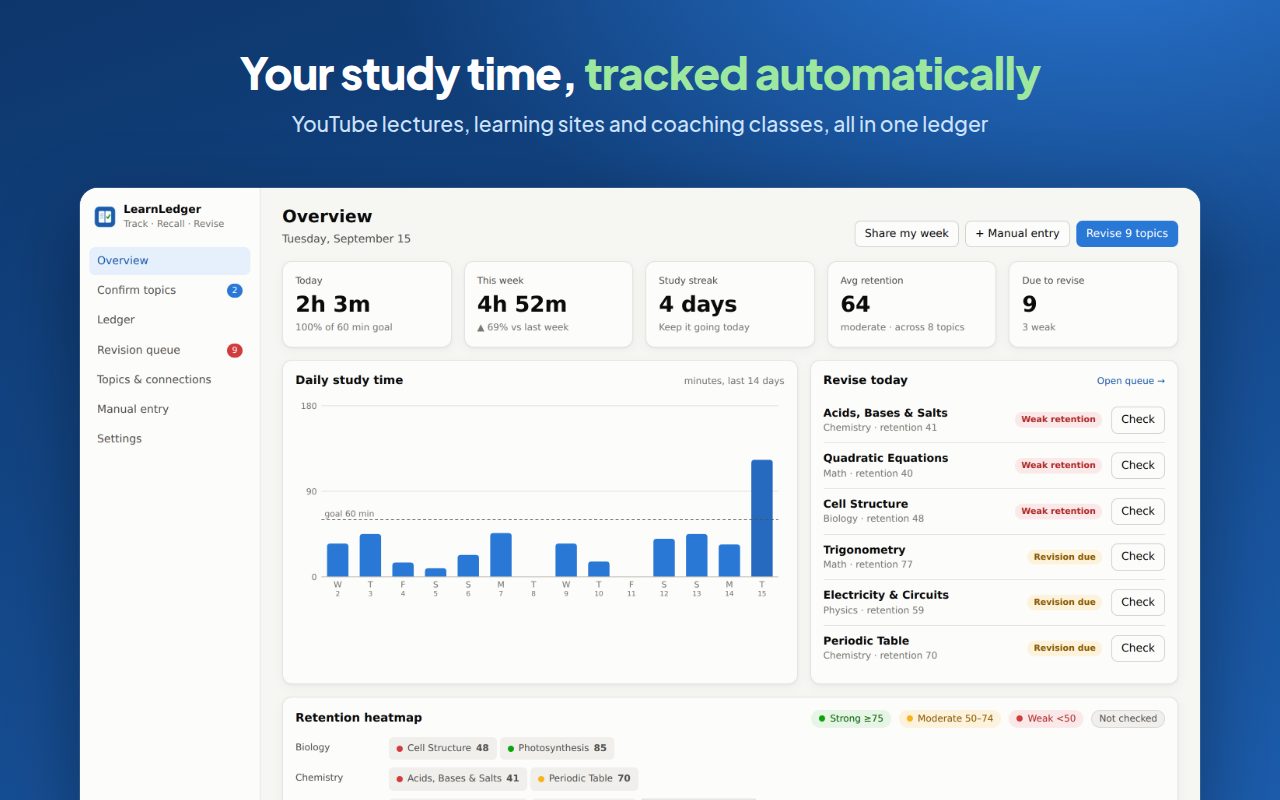
Watch a one-shot on YouTube, or read NCERT notes on LearnCBSE or Shaalaa. Only active time counts: a paused video or an idle tab doesn’t.
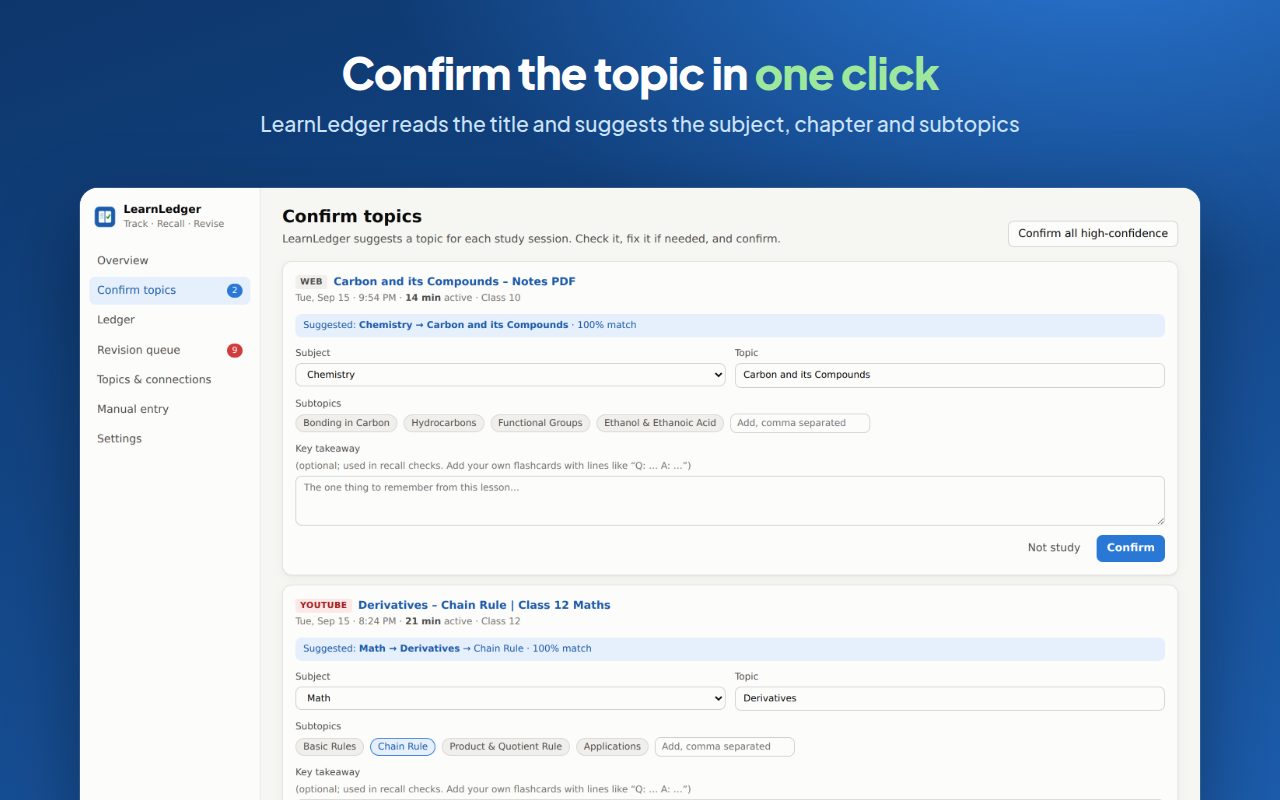
Confirm the chapter
It reads the lesson title and suggests the chapter, for example Civics → Ch 2 Federalism → Division of Powers. Hindi titles work too. One click to confirm.
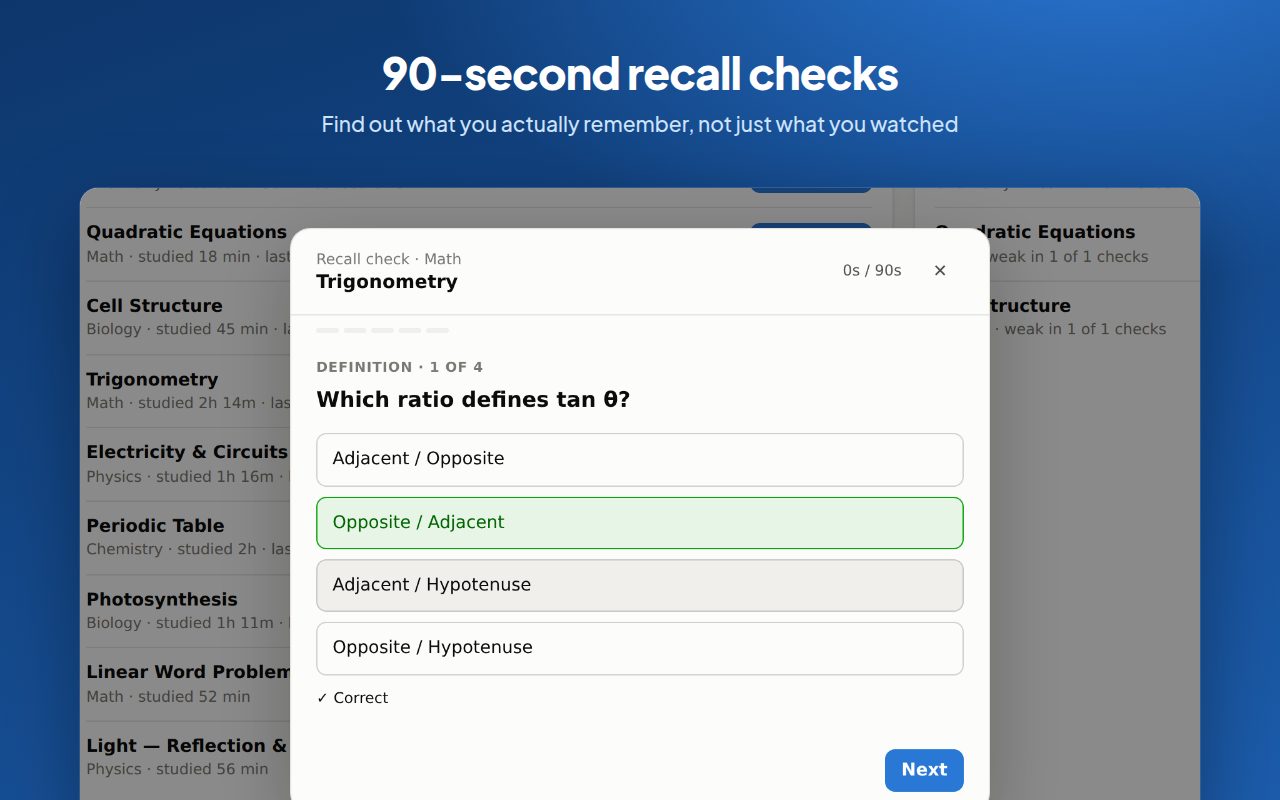
Recall, then revise
An hour later, and again a day later, answer 3–4 questions written for that NCERT chapter. Weak chapters move to the top of your revision list.
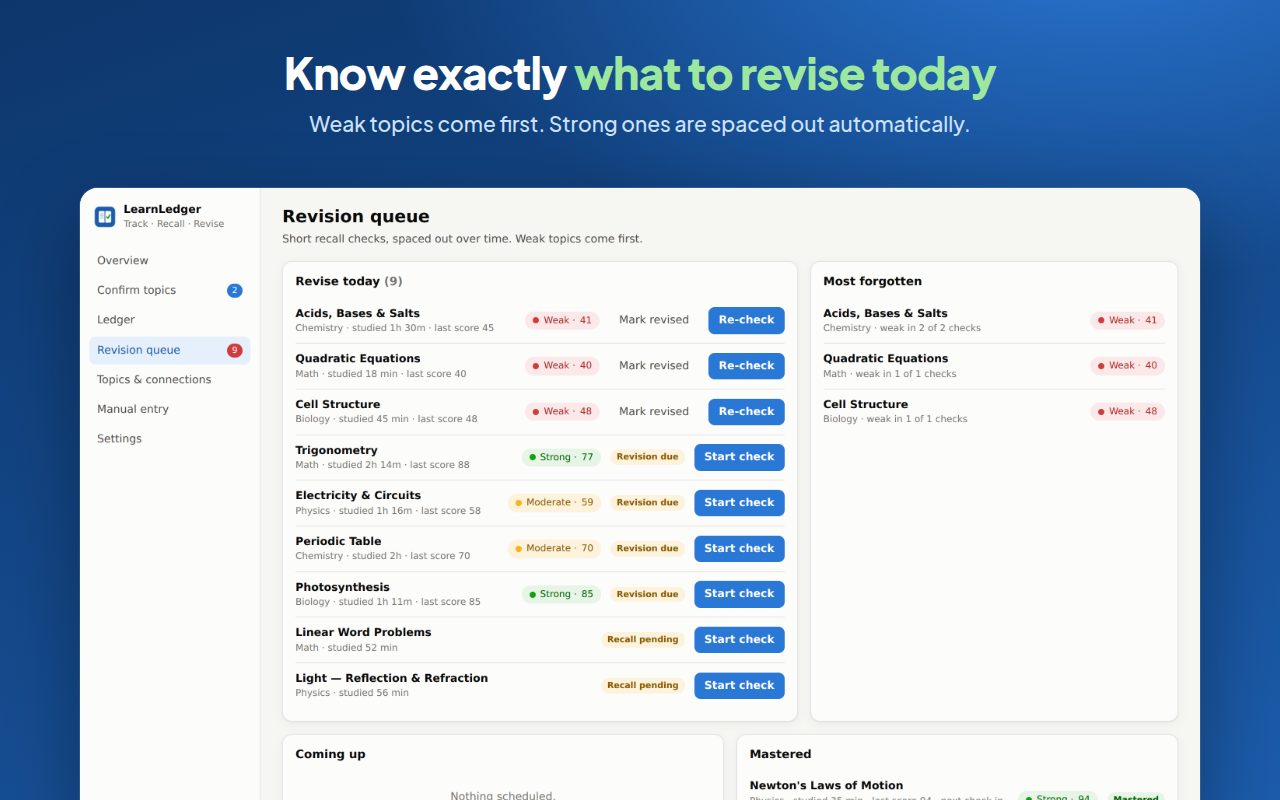
A record of your learning, and a plan for what to revise next.
Every session, logged
Date, source, chapter, subtopics, time spent and your recall score, in one searchable list you can export to CSV.
220+ NCERT questions
Every one of the 22 chapters has its own concept, definition and application questions, plus free-recall prompts.
Spaced revision
Strong chapters come back in 1, 3, 7, 14, then 30 days. Weak ones come back straight away.
Chapters that build on each other
Shaky on Gender, Religion and Caste? It shows that Power-sharing and Federalism need a look first.
Strong · Moderate · Weak
Each chapter scores 0–100 from your answers and your confidence, so you can see what is actually solid.
Science, Maths, coaching
Study outside SST and it still logs it, asks you to recall the key idea, and turns your “Q: … A: …” notes into questions.
Every chapter. Not a sample.
All 22 NCERT chapters of CBSE Class 10 Social Science, session 2026-27, each with its own recall questions and subtopics.
History · India and the Contemporary World II
- The Rise of Nationalism in Europe
- Nationalism in India
- The Making of a Global World
- The Age of Industrialisation
- Print Culture and the Modern World
Geography · Contemporary India II
- Resources and Development
- Forest and Wildlife Resources
- Water Resources
- Agriculture
- Minerals and Energy Resources
- Manufacturing Industries
- Lifelines of National Economy
Civics · Democratic Politics II
- Power-sharing
- Federalism
- Gender, Religion and Caste
- Political Parties
- Outcomes of Democracy
Economics · Understanding Economic Development
- Development
- Sectors of the Indian Economy
- Money and Credit
- Globalisation and the Indian Economy
- Consumer Rights
The Age of Industrialisation is assessed in periodic tests and Consumer Rights through project work in the 2026-27 CBSE syllabus. LearnLedger covers both anyway, and marks them in the app.
Know which chapter to revise today.
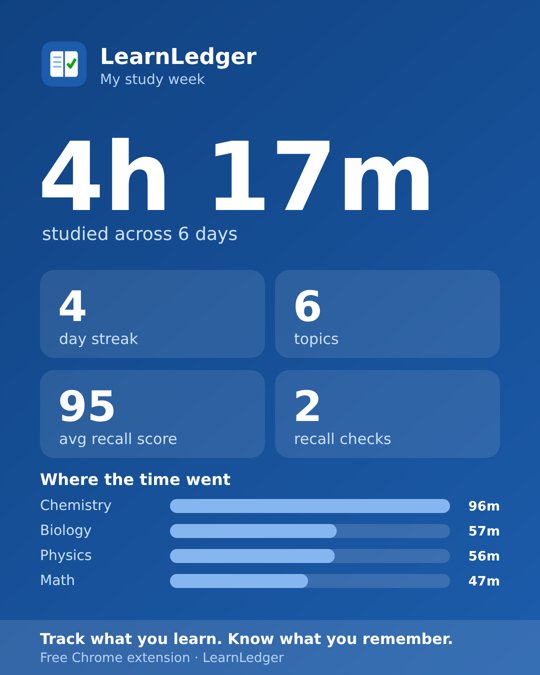
Post your week, not your screen time.
Make a weekly card for your WhatsApp status or Instagram story in one tap. It shows totals only: no names, no sites, no video titles. It's a good way to keep a study group going.
Your study data stays on your laptop.
LearnLedger has no servers and no accounts. It reads a page's title, never its content, and saves everything in your browser. Parents can check the privacy policy.
- No sign-up, email or phone number
- No ads, analytics or tracking scripts
- Social, mail and streaming sites are never tracked
- Pause anytime, export or delete everything in one click
The sites you already study on.
Brand names belong to their owners. LearnLedger is an independent tool and isn't affiliated with these sites.
FAQ
Which syllabus does it cover?
CBSE Class 10 Social Science for the 2026-27 session: all 22 NCERT chapters across History, Geography, Civics and Economics, with built-in recall questions for each.
What if I study Science or Maths too?
It still logs those sessions and schedules revision. Instead of ready-made questions it asks you to recall the key idea in your own words, and any “Q: … A: …” lines in your notes become questions. Full Science and Maths packs are next on the list.
Is it really free?
Yes. No paid plan, no trial and no ads. LearnLedger runs entirely on your computer, so it costs nothing to run.
Does it work on my phone?
Not yet. It’s a browser extension for Chrome, Edge and Brave on laptops and desktops. Phone study can be added as a manual entry.
Will it track my Instagram or games?
No. It only reads study sites and videos that look like lessons. Social media, mail and streaming sites are ignored. You can pause tracking or ignore any site.
Does it work with Hindi medium lessons?
Yes for chapter detection: titles like “भारत में राष्ट्रवाद अध्याय 2” are matched to the right chapter. The questions themselves are currently in English; a Hindi question bank is planned.
What happens to my data if I uninstall?
Chrome deletes it. Export a backup from Settings first if you want to keep your ledger.
I’m a teacher or coaching centre. Can I use it with my students?
Yes. Students can share their weekly card or export their ledger. Class dashboards are on the roadmap; get in touch if you’d like to pilot them.
Stop guessing which
chapter to revise.
Add LearnLedger to Chrome
Free · No login · Takes 10 seconds